What to take away
- Define a useful enquiry before deciding what the form should ask.
- Every question should change the next step or help the team act.
- Measure qualification, booking and attendance as separate stages.
Define what a useful enquiry looks like
A lead generation funnel connects the first promise a visitor sees with the next action your business can fulfil. Its job is not finished when a form produces a row in a spreadsheet. For a consultation-led service, the useful outcome may be a suitable person attending a conversation with the right team.
Start with an operational definition. Which services can you provide, for whom, and within what practical constraints? Ask the people who handle enquiries why they accept, redirect or decline them. Separate real eligibility requirements from preferences that could wait until a conversation.
Then choose the main next step: request a callback, check suitability or book an appointment. These actions carry different expectations. A button that says “Book a consultation” should not quietly lead to an unrelated enquiry form without explaining what happens next.
Carry one promise from the ad to the page
Before designing the form, compare the traffic source with the page. Does the visitor see the same service and an explanation of the offer? Can they understand what happens during the consultation, who it is for and what commitment is involved? Use specific language that your team can honour.
Place relevant proof beside the decision it supports. A project example can show the kind of work you do. A genuine client testimonial can describe that client’s experience. Neither should be presented as a guarantee that every new customer receives the same result.
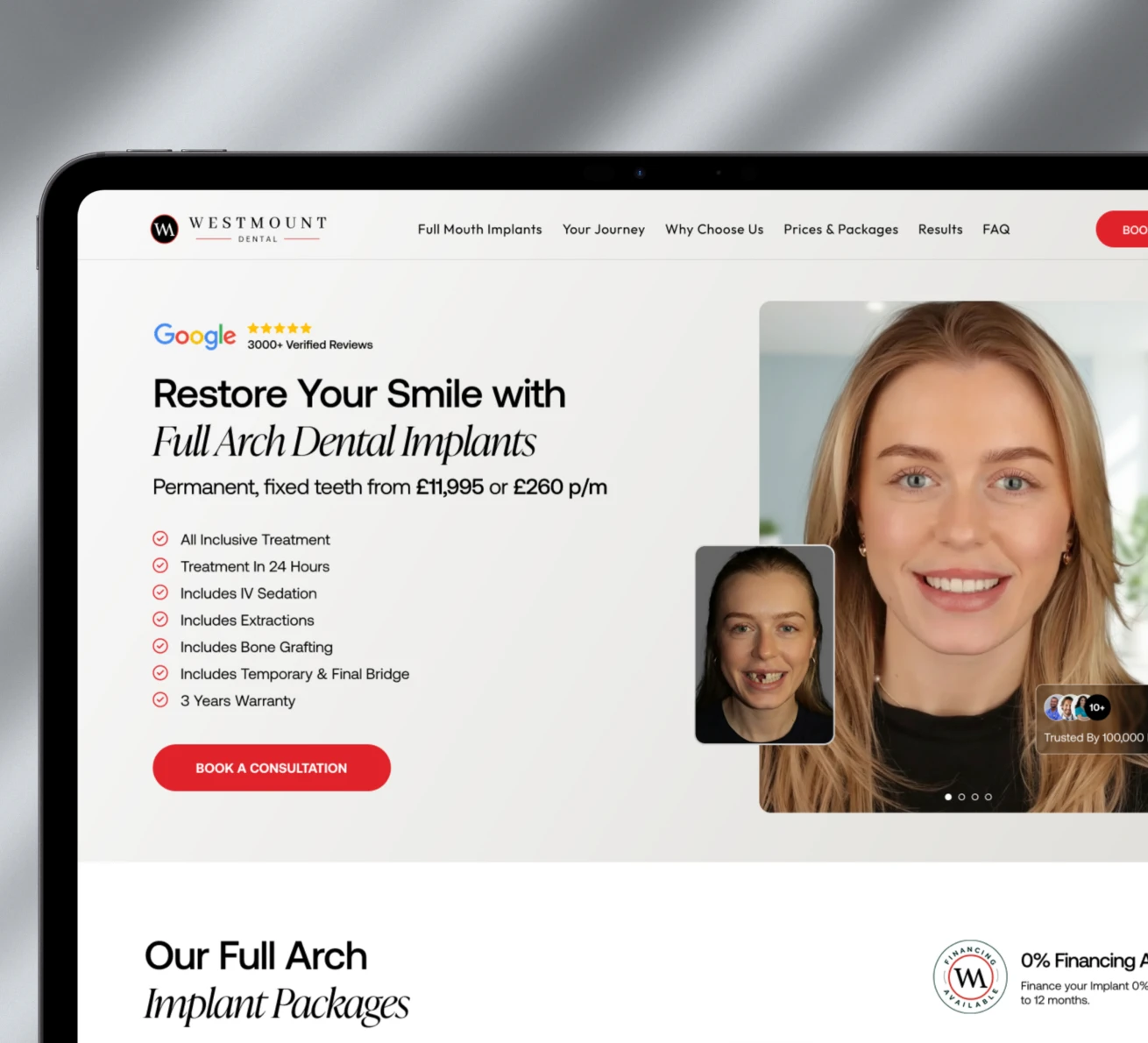
In the Westmount Dental artwork below, the implant treatment heading, package inclusions and “Book a consultation” action appear together. The visitor can identify the service and the intended next step in the same view. Use that relationship as a review prompt: can someone understand your offer before being asked to submit details?
Make each question earn its place
For every proposed field, write the decision its answer changes. A service choice may route the enquiry to a different person. A location may establish whether you can deliver the service. A free-text box can capture context, but it should not become an unexplained request for a detailed personal history.
Distinguish questions needed now from questions needed later. A short form can be appropriate when the service is straightforward and the team will qualify the enquiry in a call. A multi-step journey can be useful when answers genuinely change the path. More steps do not automatically mean better leads.
Scroll across to compare the columns
| Question | Useful when it changes… | Consider leaving it out when… |
|---|---|---|
| Which service do you need? | Routing or the available next step | The landing page already identifies one service |
| Where do you need the service? | Service coverage or availability | The answer has no operational effect |
| How should we contact you? | The follow-up channel | You already have a usable, agreed channel |
| What would you like help with? | Preparation for the conversation | It merely repeats earlier questions |
Write visible labels, explain unfamiliar terms and clearly distinguish required from optional fields. Keep answers when someone goes back. W3C’s forms guidance explains why clear labels, instructions and progress information matter for accessible multi-page forms.
Design the confirmation as part of the funnel
After submission, tell people whether they have requested contact or secured a time. State the expected next step and a response window your team can actually meet. If booking is available, show the timezone and what the appointment is for before the visitor confirms it.
The internal handoff matters as much as the confirmation screen. Decide who owns a new enquiry, which context they receive and what happens if they cannot reach the person. Keep the source and selected service connected to the record so the team does not ask the visitor to start again.
Review failure states too. An unavailable calendar should explain how to request another time. A validation error should identify the field and preserve the other answers. Test the journey with a keyboard and a phone, including slow connections and returning to a previous step.
Measure progression instead of one headline number
Give each stage an explicit definition: submitted, qualified, booked and attended. The qualification rule should be consistent enough that two team members would usually classify the same enquiry the same way. A booked appointment and an attended appointment are different events.
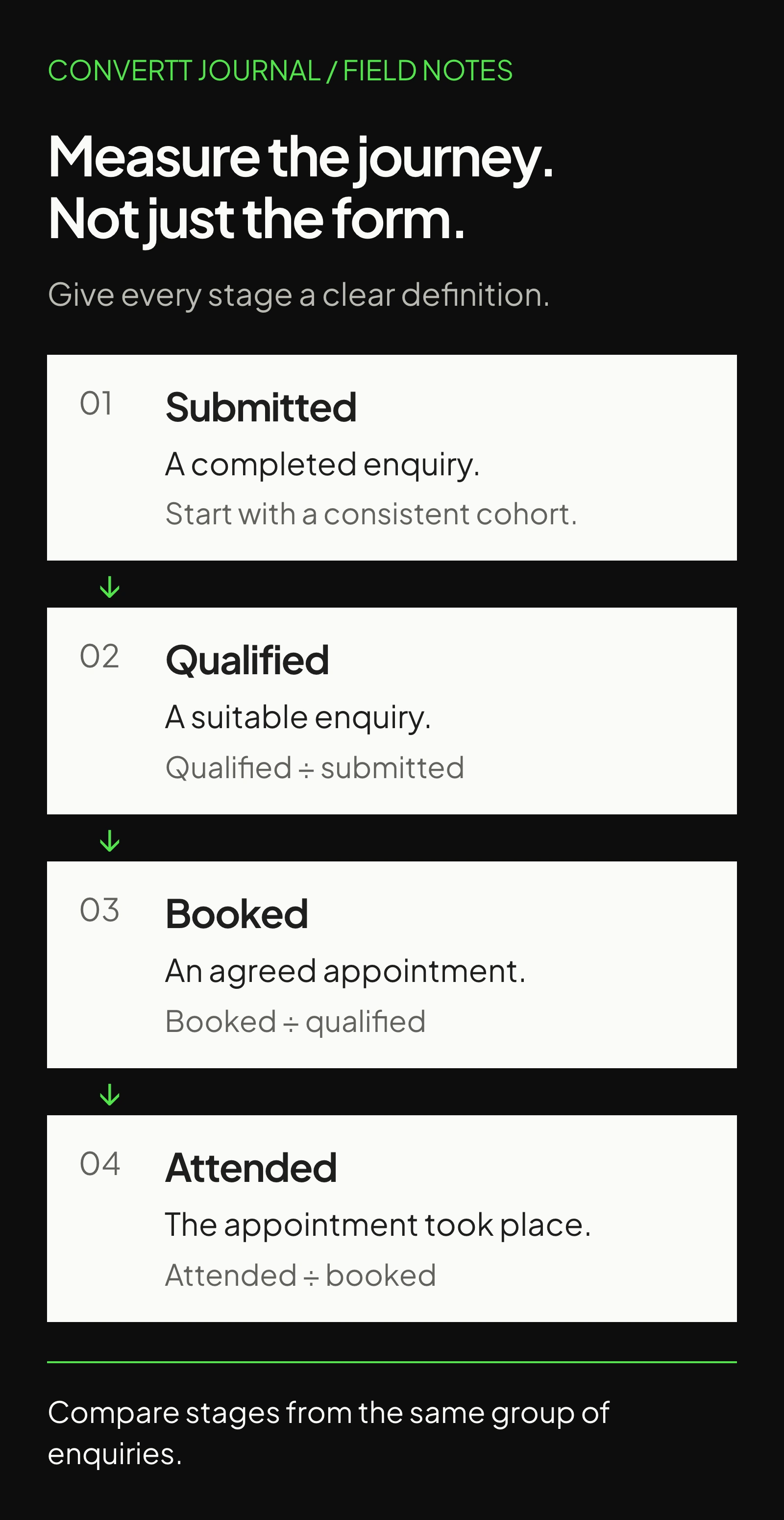
Use one cohort and allow time for it to progress. Comparing this week’s enquiries with this week’s appointments can mix people who entered at different times. Record the reporting window and how long the typical journey takes before interpreting changes.
GA4 has recommended events for lead creation and qualification. Your CRM or booking system may be the better source for later outcomes. Keep event definitions aligned and avoid duplicate counts when the same person resubmits. Google’s Analytics guidance also prohibits sending personally identifiable information; keep contact details out of event parameters and URLs.
In the calculator, qualification rate means qualified enquiries divided by submitted enquiries. Booking rate means booked appointments divided by qualified enquiries. Attendance rate means attended appointments divided by booked appointments. Use those same definitions when entering your own numbers.
Follow the lead to the appointment
See how qualification, booking and attendance affect the same starting number of enquiries.
Scenario, not a forecast. Rates apply to the previous stage. Use one consistent time period and allow time for leads to progress. Inputs stay in your browser.
The example inputs produce 45 attended appointments from 200 enquiries: 200 × 50% × 60% × 75%. These are illustrative assumptions, not a benchmark or a client result. Change one stage to see which operational question you need to investigate.
Use the pattern to choose the next investigation
If many people begin the form but few submit, check the questions, validation and technical behaviour. If submissions are healthy but few qualify, inspect the traffic promise and the eligibility explanation. If qualified people do not book, look at the handoff, availability and expectations.
Avoid assuming the page is always the cause. A calendar with no suitable times, delayed follow-up or a confusing confirmation can interrupt an otherwise clear journey. Sit with the person who handles leads and follow a few records from source to outcome.
Change the step that the evidence points to, then monitor the whole journey. Removing a field could increase submissions while making preparation harder. Adding a question could help routing while discouraging suitable people. Judge the trade-off against the outcome you defined, not the form conversion rate alone.
Walk the whole journey before sending traffic
Enquiry-to-appointment checklist
0 of 8Work through your page. Your progress stays in this browser.
No account needed. Nothing is sent to Convertt.
Sources & further reading
The references behind this guide. Examples and recommendations remain distinct from reported client results.
- W3C WAI: multi-page forms
Accessibility guidance for dividing longer forms, communicating progress and supporting navigation.
- Google Analytics: recommended events
Reference for generate_lead and qualify_lead event definitions; the illustrative funnel numbers are our own arithmetic.
- Google Analytics: avoiding personally identifiable information
Explains Google Analytics restrictions on personal information, including URL paths and parameters.
- Convertt: Westmount Dental project
Source of the page artwork; no client outcomes are inferred from its appearance.
What happens after the form?
Explore how Convertt approaches the work, then look at an actual project in detail.